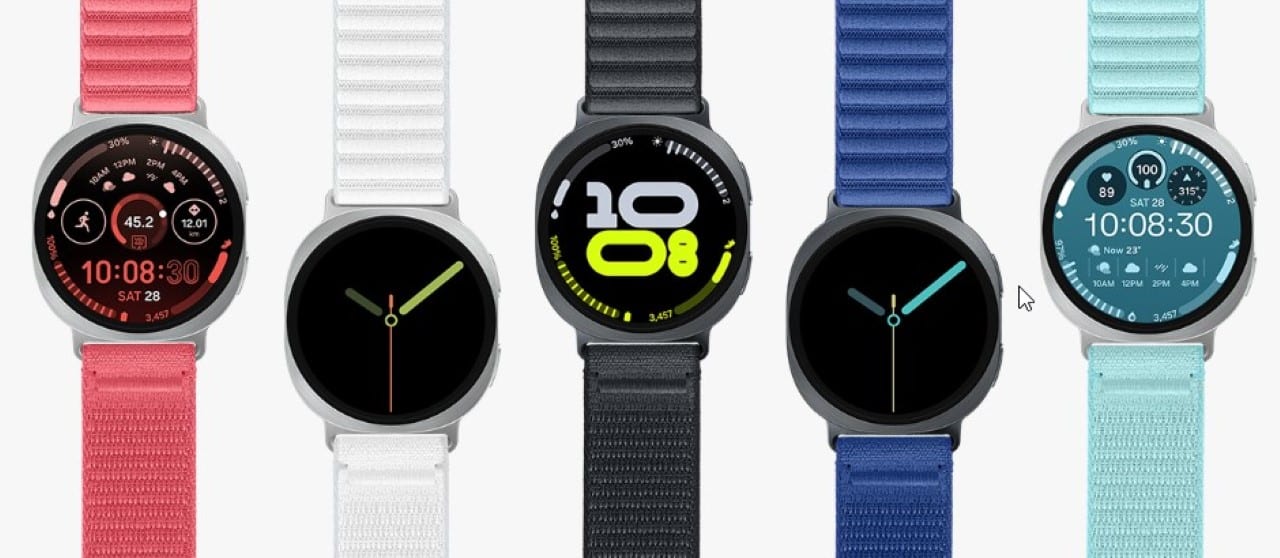
Samsung has started global distribution of the One UI 8.0 Watch software package for the standard and classic models of the Galaxy Watch 4. The installation file requires approximately 1.5 gigabytes of free space on the device’s internal storage to unzip properly. The transfer includes the latest security patch, focused on protecting the wearable ecosystem against newly discovered vulnerabilities.
The process marks a decisive technical moment for this generation of hardware, as it represents the delivery of the last major interface modification promised by the brand. The extended support strategy aims to keep device functionality aligned with current connectivity and physical monitoring requirements. Especialistas point out that prolonged maintenance of operating systems extends the useful life of products and reduces the need for frequent replacements by consumers.

Release schedule and availability in markets
The software release calendar began with the Asian market, with an initial focus on the manufacturer’s home country, before moving on to other strategic regions. Nas following weeks, technology forums recorded the arrival of the package in several countries on the European continent, in addition to voluminous markets such as Índia and América. The company adopts this fragmented approach in waves to avoid overloading the servers and monitor possible code flaws that may arise during the first public installations. Equipment that depends exclusively on the Bluetooth connection is usually the first to receive the update notification. Logo Then, variants that support independent mobile networks are also covered by the distribution schedule.
This time difference occurs due to the need for software approval by local telephone operators. Telecom companies need to ensure that mobile calling and data functions continue to operate smoothly after structural system change. Proprietários in regions not yet covered by the initial schedule, you must wait for automatic notification in the next few days, keeping the cell phone application always updated.
Visual changes and interface restructuring
The new version of the operating system brings a profound aesthetic overhaul, designed to create a unified visual identity with the interface used on smartphones from the same brand. The applications’ native icons have undergone a complete redesign, gaining more vibrant colors and defined contours that facilitate quick identification during physical activities or under strong sunlight. The configuration menus have adopted a denser layout, which allows a greater amount of text and options to be displayed simultaneously on the circular screen. One of the most notable additions to everyday navigation is the introduction of a quick access bar located at the bottom of the main dial. Esse graphic element works as a dynamic hub, displaying contextual information based on the user’s time and habits. The bar can show media controls while a song is playing or the remaining time of an active timer, reducing the need to scroll through multiple screens. The notification system has also undergone a logical restructuring, implementing intelligent grouping by application instead of a continuous and disorganized list. The modification significantly improves the reading of long conversations and optimizes the use of pre-programmed quick responses or voice dictation directly from the wrist.
Optimizing physical monitoring and well-being
Interaction with the smart watch has been expanded beyond touching the screen and using the physical buttons on the side. The accelerometer and gyroscope can now identify specific motor patterns, incorporating a very advanced gesture recognition system. The manufacturer’s central health application also received structural updates to display the data collected by biometric sensors more clearly. Daily summary sheets now feature easy-to-understand graphs that highlight long-term trends instead of just focusing on isolated numbers.
To improve the daily usage experience and health tracking, the update introduced specific tools that operate in the background. The main news in this sector include:
- Double pinch movement with your fingers to execute commands such as scrolling pages or activating the paired cell phone camera.
- Quickly turn your wrist to open details of newly arrived notifications without needing to use your other hand.
- Periodic reminders to hydrate, stretch and take active breaks during the workday.
- Refined algorithms that reduce energy consumption during continuous sleep monitoring.
- Custom dashboards that combine metrics from different applications into a single interactive widget.
Rewriting these codes resulted in more accurate measurements of heart rate and blood oxygenation, even with the physical limitations of the hardware released a few years ago. Technical reports indicate that power management has been improved globally. The operating system now suspends background processes more aggressively when the watch is not in active use, compensating for natural battery wear.
Technical procedures for safe installation
Performing the update requires the user to follow basic digital security protocols to prevent data corruption during flash memory rewriting. The first fundamental step is to ensure that the smart watch has at least half of its total battery capacity available before starting the process. The experts’ ideal recommendation is to keep the device attached to the magnetic charging base throughout the transfer and installation procedure. A power outage while the file is unzipped may cause the system to become temporarily unusable, requiring specialized technical assistance. Preferencialmente, the package must be downloaded while the paired smartphone is connected to a high-speed Wi-Fi network. Essa precaution avoids excessive consumption of the mobile data allowance and guarantees a continuous and uninterrupted transfer. The cell phone management application acts as the operation controller, downloading the encrypted file from the manufacturer’s servers. Após verify integrity via security keys, the software sends the data blocks via Bluetooth connection directly to the watch storage. Durante installation, the screen will display moving gears and the equipment will automatically restart several times, during which time the buttons should not be pressed.
End of large package cycle for generation
The delivery of this software version marks full compliance with the support policy announced by the manufacturer at the time of the commercial launch of these devices. The promise to deliver four major operating system updates was a milestone in the wearables industry, setting a new standard of longevity for devices that have historically been abandoned by brands after a year or two on the market. From this moment on, the development cycle of this specific line of watches enters a passive maintenance phase. Isso means that the graphical interface and core functionalities will no longer undergo profound changes or significant aesthetic overhauls.
Technical support will continue to be active exclusively for sending periodic security packages. Essas specific fixes will serve to close critical data protection gaps or resolve specific flaws that affect the basic functioning of the hardware. The transition ensures that devices remain safe for use in contactless financial transactions and for storing sensitive health data. Owners can continue using their equipment with the certainty that the software has reached its maximum level of maturity and operational stability.
