
Samsung has kicked off the rollout of One UI 7, its latest operating system update based on Android 15, promising a wave of features set to redefine the user experience. The update officially launched on April 7, starting with top-tier devices like the Galaxy S24 series. Structured in three phases spanning April to June, the deployment targets a wide range of smartphones and tablets, from flagships to mid-range models. Packed with artificial intelligence enhancements and a revamped interface, this update is already generating buzz among Galaxy users worldwide.
Following an extensive beta testing phase that began last December, One UI 7 arrives with a polished design and a gradual distribution plan. Samsung prioritized its newest and most popular devices for the initial wave, with older and more affordable models slated for later stages. Alongside new features, the update includes the April security patch, bolstering device protection and performance for millions of users.
Over the coming months, the rollout will expand to include Galaxy S, Z, A, and Tab series devices. While early adopters can dive into the new tools right away, others will need to wait based on their device model and region. Below, the text breaks down the key features, the official rollout schedule, and the steps to install One UI 7 on your Samsung device.
What One UI 7 brings to Samsung users
Unlike previous updates, One UI 7 stands out for its deep integration of artificial intelligence, which powers several standout features. One highlight is the Audio Eraser, a tool that removes unwanted noises from video files with impressive accuracy. Available first on models like the Galaxy S24 and Z Fold 6, it can filter out sounds such as wind, chatter, or background hum, enhancing audio clarity.
Another game-changer is the Writing Assist, a real-time text editor embedded in the system. It offers grammar corrections, style suggestions, and even sentence rewrites, rolling out to devices like the Galaxy S24, S23, and Tab S10 series. Meanwhile, the Drawing Assist takes creativity up a notch by turning basic sketches into detailed images, a feature tailored for models like the Galaxy Z Fold 6 with S Pen support.
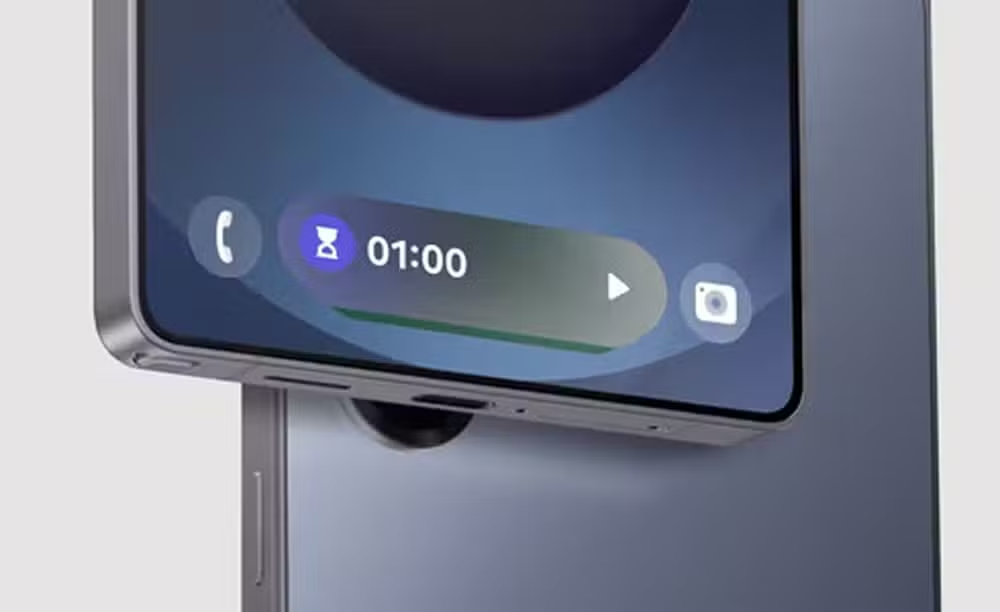
The interface has also seen a major overhaul. The Now Bar delivers live app updates directly on the lock screen, while redesigned notifications and quick settings make navigation smoother. Additionally, the Good Lock customization suite has been upgraded with fresh options, letting users tweak everything from icons to layouts for a truly personalized experience.
Official rollout schedule: when your device gets One UI 7
Samsung has mapped out the One UI 7 rollout in three distinct phases, starting in April and wrapping up in June. The first wave, launched on April 7, targets the brand’s latest premium devices. Leading the pack are the Galaxy S24, S24 Plus, and S24 Ultra, which were heavily featured in the beta program. The foldable lineup, including the Galaxy Z Fold 6, Z Flip 6, and Z Fold Special Edition, joins in, alongside tablets like the Galaxy Tab S10 Plus and Tab S10 Ultra.
May brings the update to a broader mix of devices, including the Galaxy Z Fold 4 and Z Flip 4, as well as the entire Tab S9 lineup—base, Plus, and Ultra models. The Galaxy S22 series, covering S22, S22 Plus, and S22 Ultra, gets its turn, along with the S23 FE and mid-range stars like the Galaxy A34 and A35. Older flagships such as the Galaxy S21, S21 Plus, and S21 Ultra also join this phase, showcasing Samsung’s commitment to long-term support.
June rounds out the rollout with entry-level devices and additional tablets. The Galaxy A15, A24, A25, A33, A53, and A73 headline this stage, while tablets like the Tab S9 FE and Tab S9 FE Plus follow suit. Niche models like the Galaxy Quantum 3 and Jump and Buddy series wrap up the schedule, ensuring even lesser-known devices get the update.
How to install One UI 7 on your Samsung
Updating to One UI 7 is straightforward, though a few precautions can ensure a smooth process. To check for availability, head to your device’s Settings app, scroll to “Software update,” and tap “Download and install.” If the update is ready for your model, it will begin downloading once you approve it.
Before starting, back up essential data like photos, videos, and contacts, as major updates can occasionally lead to glitches. Ensure your device has at least 50% battery and a stable Wi-Fi connection, since the update file could exceed 1 GB depending on the model. Once downloaded, the device will restart to complete the installation, a step that may take 10 to 30 minutes—avoid interrupting it to prevent issues.
After installation, users will be greeted by the refreshed interface and can start exploring the new features. Keeping the device plugged in during this process is a smart move to avoid power-related hiccups.
Key devices in the first wave of updates
The April rollout focuses on Samsung’s cutting-edge lineup. The Galaxy S24 series—standard, Plus, and Ultra—takes center stage, being the first to receive the stable update after extensive beta testing. These models unlock the full suite of AI tools, including Audio Eraser and Writing Assist, thanks to their robust hardware.
Foldables shine in this phase too. The Galaxy Z Fold 6 leverages its large screen for features like Drawing Assist and Now Bar, while the Z Flip 6 offers a compact yet powerful experience with the same capabilities. The Z Fold Special Edition, a recent addition, keeps pace, highlighting Samsung’s focus on flexible-screen tech.
Tablets join the party early as well. The Galaxy Tab S10 Plus and Tab S10 Ultra, with their expansive displays and S Pen compatibility, get the update right away, making them ideal for Drawing Assist and other creative tools. The S23 series—S23, S23 Plus, S23 Ultra, and S24 FE—rounds out this initial batch, ensuring last year’s flagships stay current.
AI features reshaping the One UI 7 experience
Artificial intelligence drives the most exciting changes in One UI 7, delivering tools that streamline daily tasks and boost creativity. The Audio Eraser analyzes video audio to eliminate distractions like background noise or stray voices, preserving the main sound. Early feedback suggests it excels with distinct audio layers, though complex recordings might challenge its precision.
The Writing Assist caters to frequent typists, offering real-time edits across apps with suggestions for grammar, tone, and phrasing. Meanwhile, the Drawing Assist transforms rough sketches into polished visuals, a boon for S Pen users on devices like the Z Fold 6 and Tab S10 series. The AI Select tool simplifies GIF creation by auto-detecting key moments in videos, adding a fun twist to media editing.
Paired with practical additions like the Now Bar and a smarter notification filter, these AI enhancements show Samsung’s push to make One UI 7 both intuitive and versatile, catering to a wide range of user needs.
Mid-range devices take the spotlight in May
May ushers in the update for mid-range favorites and older flagships. The Galaxy A34 and A35, known for their value-for-money appeal, gain access to core One UI 7 features like Writing Assist and the notification filter. With capable hardware, these models promise a smooth transition to the new system.
The S22 lineup—S22, S22 Plus, and S22 Ultra—joins the fray, benefiting from Samsung’s four-year update pledge. Foldables like the Z Fold 4 and Z Flip 4 also get updated, bringing Now Bar and Drawing Assist to their flexible displays. The Tab S9 series, including base, Plus, and Ultra variants, enhances its productivity chops with the new tools.
Rounding out this phase are the S23 FE, the budget-friendly Z Fold 3 and Z Flip 3, and legacy models like the S21 trio. Even the Galaxy A16 and Quantum 5 and 4 make the cut, ensuring a diverse mix of devices stays relevant.
Entry-level devices join in June
June marks the final stretch, targeting budget-friendly devices and additional tablets. The Galaxy A15, A24, A25, A33, A53, and A73 lead this wave, bringing One UI 7 to cost-conscious users with essentials like Now Bar and notification tweaks. While some AI features may run lighter due to hardware limits, the update keeps these devices competitive.
Tablets like the Tab S9 FE and Tab S9 FE Plus join in, offering big-screen benefits with the new system. Lesser-known models, including the Galaxy Quantum 3 and Jump and Buddy lines, get their turn, while tablets like the Tab A9, Tab A9 Plus, Tab Active 5, Tab Active 4 Pro, and Wide 7 extend the rollout to rugged and affordable options.
Tips to maximize your One UI 7 experience
Getting the most out of One UI 7 starts with preparation. Here are some practical pointers:
- Back up your data to Samsung Cloud or another service before updating.
- Free up at least 2 GB of storage to accommodate the update file.
- Use a fast Wi-Fi connection to avoid download delays.
- Dive into features like Now Bar and Writing Assist right after installation.
These steps pave the way for a seamless upgrade and let users explore the new system without hiccups.
Detailed rollout calendar by model
Samsung’s rollout plan spans three months, tailored to device categories. Here’s the breakdown:
- April: Galaxy S24, S24 Plus, S24 Ultra, Z Fold 6, Z Flip 6, Z Fold Special Edition, Z Fold 5, Z Flip 5, Tab S10 Plus, Tab S10 Ultra, S23, S23 Plus, S23 Ultra, S24 FE.
- May: Z Fold 4, Z Flip 4, Tab S9, Tab S9 Plus, Tab S9 Ultra, S23 FE, Z Fold 3, Z Flip 3, A34, A35, S22, S22 Plus, S22 Ultra, Tab S8, Tab S8 Plus, Tab S8 Ultra, S21, S21 Plus, S21 Ultra, A16, Quantum 5, Quantum 4.
- June: Tab S9 FE, Tab S9 FE Plus, A73, A53, A33, A25, A24, A15, Quantum 3, Jump 3, Jump 2, Buddy 3, Tab A9, Tab A9 Plus, Tab Active 5, Tab Active 4 Pro, Wide 7.
This phased approach balances speed and stability across Samsung’s vast ecosystem.
Enhanced customization with Good Lock in One UI 7
Good Lock, a fan-favorite customization tool, gets a boost in One UI 7. Available via the Galaxy Store, it now offers deeper control over the interface—think icon sizes, lock screen layouts, and system animations. It’s compatible with most updated devices, making it a must-try for personalization buffs.
Users can craft unique themes or tweak quick settings for efficiency, pushing the boundaries of what’s possible beyond standard options. It’s a standout addition that keeps One UI 7 flexible and user-centric.
Security upgrades in One UI 7
Beyond the flashy features, One UI 7 bolsters device safety. The April security patch tackles over 58 vulnerabilities, including 11 critical ones, spanning Wi-Fi services, sensitive comms, and even the Galaxy Watch Gallery app. These fixes keep devices secure against emerging threats.
The Knox security platform also gets a tune-up, enhancing data protection across the board. This blend of visible upgrades and behind-the-scenes improvements makes One UI 7 a robust update for Samsung users.
One UI 7’s impact on Galaxy tablets
Tablets like the Tab S10 and Tab S9 series see big gains with One UI 7. Drawing Assist shines on their large screens with S Pen support, while Writing Assist streamlines note-taking and editing in apps like Samsung Notes. It’s a productivity boost for power users.
Even budget models like the Tab S9 FE and Tab A9 get in on the action, picking up Now Bar and notification enhancements. This broad rollout unifies the experience across Samsung’s tablet lineup, regardless of price point.
Why Samsung opts for a phased rollout
Staggering the One UI 7 release helps Samsung manage server load and catch any bugs early, ensuring a smoother experience. It also gives carriers time to adapt the software, especially in markets like the U.S., where delays can occur. For users, it means a wait tied to their device, but a more reliable update in return.
This methodical approach reflects Samsung’s global scale, serving millions of devices across diverse regions with precision.
Fun facts about One UI 7’s development
One UI 7 underwent rigorous testing, with a beta program starting last December. Six beta builds were rolled out for the Galaxy S24 series, expanding to Z Fold 6, Z Flip 6, and Tab S10 by March. This effort paid off with smoother animations and well-tuned AI features.
Interestingly, the update debuted with the Galaxy S25 series in January, serving as a showcase before hitting older models. It’s a strategic move that highlights the system’s potential on cutting-edge hardware first.
