
The iOS 26 update, released by Apple in September 2025, established the Vista Previa app as an indispensable native tool for iPhone and iPad users. Inspirada in the robust version for macOS, the application centralizes the viewing, editing and management of PDF documents and images, eliminating the need to resort to third-party solutions for essential day-to-day tasks. Muitos users are still discovering the vast potential of the tool, which integrates perfectly into the brand’s ecosystem.
The application was designed to simplify processes that previously required multiple software. With the Vista Previa, it is possible to automatically open downloaded PDF files, use the device’s camera to scan physical documents with high precision and even fill out digital forms, with the system suggesting contact information saved on the device. Essa deep integration with the operating system significantly optimizes mobile workflow.
Apple’s proposal with Vista Previa is to offer a set of advanced features at no additional cost, reinforcing the value of its ecosystem. The tool not only replicates basic functionalities, but also introduces sophisticated editing capabilities directly on the iPhone, promoting greater productivity and security, as data is processed locally or via iCloud, without depending on external servers.
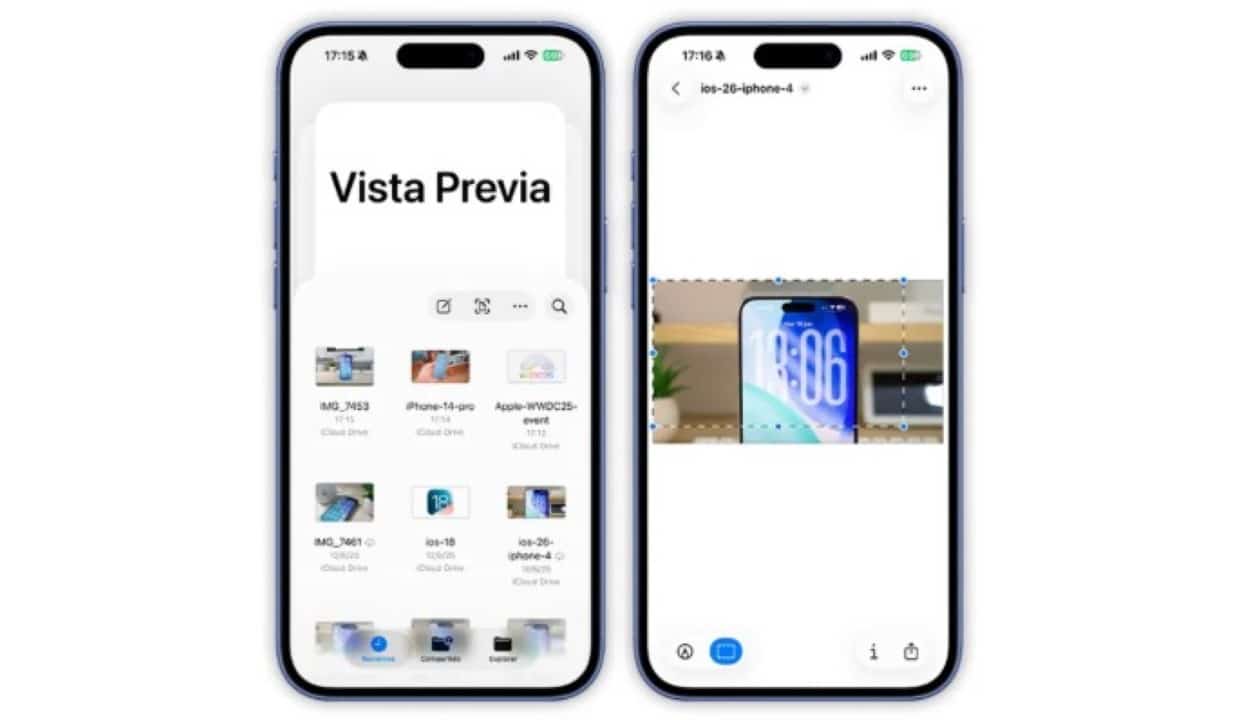
Advanced features for PDF documents
Vista Previa transforms the way users interact with PDF files on mobile devices. The platform offers a complete arsenal of markup tools, allowing you to highlight important sections with different colors, underline texts, add notes and even insert digital signatures with ease, whether by drawing with your finger or using a saved image. Para professionals who deal with contracts, reports and forms on a daily basis, this functionality speeds up reviews and approvals, making the process more efficient and eliminating the need to print documents. Além Furthermore, security is a central pillar of the application. You can protect sensitive files by adding passwords directly from the app, a crucial layer of protection that prevents vulnerabilities often associated with third-party applications. Integration with iCloud
Simplified and powerful image editing
In addition to its competence with PDFs, Vista Previa stands out as a versatile image editor. The tool allows you to make quick and complex adjustments without leaving the native application. Funções like cropping, rotating, and resizing are intuitive and accurate, mirroring the simplicity found in the desktop version. One of the most impactful features is single-touch background removal, a feature that uses the A-series chip’s artificial intelligence to isolate objects and people with precision, ideal for creating graphic materials and presentations.
For iPad users, the experience is further enhanced with full support for Apple Pencil, which allows you to annotate, draw, and mark up images with the precision of a real pen. Essa synergy transforms the tablet into a powerful work tool for designers, photographers and students. Vista Previa centralizes operations that would previously require the combined use of multiple applications, optimizing time and simplifying visual file management across all Apple devices.
Full integration with the Apple ecosystem
The strength of Vista Previa lies in its deep integration with the Arquivos application. Essa synergy allows users to view the contents of documents and images quickly, without the need to open them in full screen, speeding up navigation through folders stored locally or in iCloud Drive.
When you tap a PDF file within the Arquivos, it opens directly in the Vista Previa, ensuring a seamless and seamless workflow. Essa native integration eliminates the friction of switching between different applications, consolidating document management into a single cohesive and efficient environment.
Turning iPhone into a Pocket Scanner
The Vista Previa’s scanning feature is one of its most practical features, converting your iPhone’s camera into a high-quality portable scanner. The embedded technology automatically corrects the document’s perspective, enhances colors and increases text readability.
Users can scan receipts, contracts, class notes or any physical document in a matter of seconds. The tool also allows you to create multi-page PDF files from several sequential scans.
After scanning, you can add notes, signatures or markings immediately, as well as export the finished file to other applications or share it via email and messengers, making the scanning and distribution process extremely agile.
How the tool optimizes productivity
By centralizing multiple editing functions in a single native application, Vista Previa increases users’ daily productivity. The main advantage is the elimination of dependence on third-party apps, many of which require paid subscriptions to unlock essential features.
The intuitive interface, which follows the iOS 26 design standard, facilitates adoption by new users, who quickly discover advanced features hidden under contextual menus.
This approach allows professionals and students to maintain a more fluid and organized workflow, whether on the iPhone or iPad. The tool is especially useful for quick tasks, such as signing a document received by email or making an adjustment to an image before publishing it.
Apple demonstrates with Vista Previa its commitment to strengthening its suite of native applications, offering robust solutions that compete directly with the most popular options on the market.
File management and export
Vista Previa’s versatility extends to file management, allowing users to combine multiple documents, such as images and PDFs, into a single consolidated PDF file. The export process is equally flexible, maintaining the original quality and offering compatibility with different formats, ensuring that files can be shared and viewed on any platform without loss of data or formatting.
First steps for new users
For those just starting to explore Vista Previa, the ideal is to open an existing PDF on the device to familiarize yourself with the viewing and markup tools. Next, it’s worth testing the scanning function, accessible directly through the Arquivos application, to scan a physical document and observe the quality of the capture.
Exploring the image editing options in the Fotos library is also a great way to understand the tool’s potential. Adicionar passwords to sensitive documents and checking automatic syncing via iCloud are important steps to safely and efficiently incorporating Vista Previa into your daily routine.
