
One UI 8.0 Watch arrives on the Galaxy Watch 4 in European countries with new features in 2025

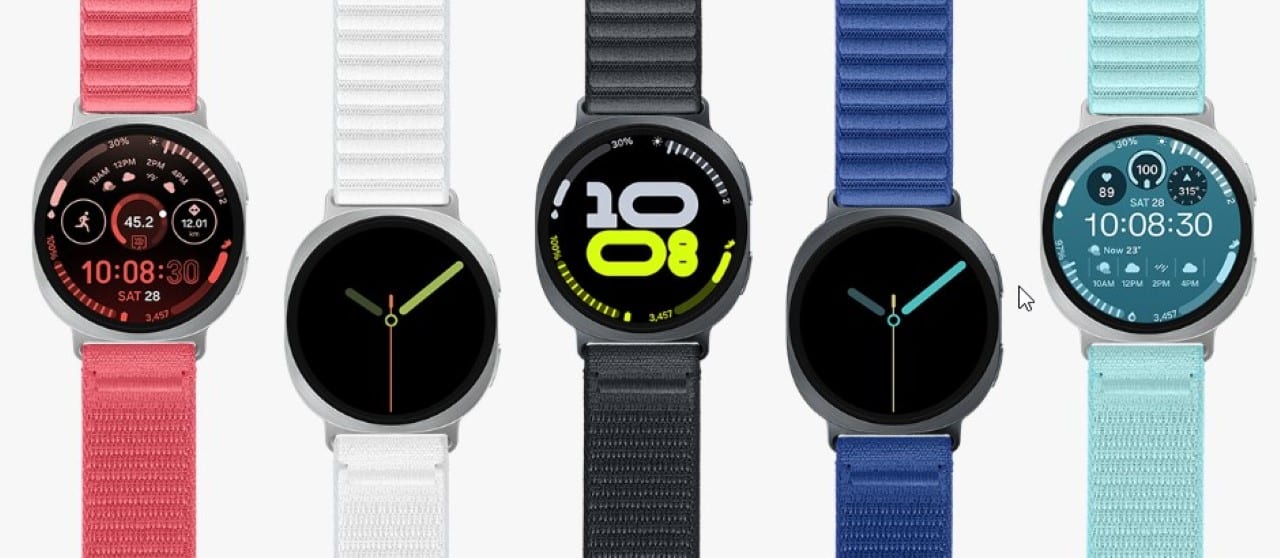
Samsung has started rolling out the One UI 8.0 Watch for the Galaxy Watch 4 series smartwatches in several global regions. Proprietários of models Galaxy Watch 4 and Galaxy Watch 4 Classic in countries such as Coreia of Sul,
This update, which includes the October 2025 security patch and is approximately 1.7 GB in size, represents the last major system release promised by the manufacturer for these devices, originally released in 2021. The global expansion follows the initial release in Coreia of Sul, in mid-December 2025.

Users are encouraged to check update availability directly on their watch by going to software settings. The Samsung thus fulfills the promise of four years of support for major versions of the One UI Watch for the line, focusing on improvements in stability and general performance.
Improved interface and visuals
One UI 8.0 Watch features a completely redesigned interface, aligning more cohesively with the mobile version of the One UI, offering a more integrated and intuitive user experience. App icons and system text have been updated, giving them a clean, modern look that improves the readability and overall aesthetics of the system.
In addition to the visual improvements, the menus now adopt a more compact layout, allowing more information to be displayed on the screen without the need for excessive scrolling. One of the notable additions is Now Bar, a smart bar that appears at the bottom of the home screen, providing quick access to relevant information and essential everyday functions, optimizing navigation.
Interactivity with gestures and customization
Galaxy Watch 4 users now have double pinch gestures, an innovative feature that allows them to perform various actions more intuitively. Essa new interaction makes it easier to control music, scroll through notifications and even remotely capture photos, all with simple finger movements, increasing practicality in daily use.
Another added gesture is the double finger twist, which displays full notification details, while a tap on a star icon lets you mark reminders as important. Essas improvements in interactivity aim to make navigation and task management on the smartwatch more fluid and efficient, responding to users’ demands for greater ease of use.
Personalization has also received attention, with search for watch faces improved through keywords and personalized recommendations based on user preferences. Adicionalmente, you can create custom tiles, combining data from multiple applications into a single widget, offering unprecedented flexibility to adapt the watch to your individual lifestyle.
Health optimizations and alerts
Notifications in Galaxy Watch 4 have been significantly improved in One UI 8.0 Watch, now appearing in a more attractive and organized format. Cards are stacked vertically by application, making it easier to view and manage received alerts, ensuring that important information is accessed more efficiently.
The Samsung Health application has also received a notable update, incorporating a new general awareness tool. Essa functionality aims to help users maintain a more balanced daily well-being, offering insights and monitoring to promote healthy habits and a more active life.
Although some advanced health features present in newer models are not available on the Galaxy Watch 4 due to hardware limitations, the update significantly optimizes battery life and overall system speed. Usuários who have already installed One UI 8.0 Watch report a more fluid and responsive experience after installation.
Software installation procedure
So that owners of the Galaxy Watch 4 can enjoy the new features of the One UI 8.0 Watch, it is essential to follow a simple installation procedure. Primeiramente, the smartwatch must be connected to the paired smartphone via Bluetooth, ensuring stable communication between the devices for transferring update data.
Then the user needs to open the Galaxy Wearable app on their smartphone and navigate to the watch’s software update section. When you find the option, simply tap “download and install” if the update is available for the model in question. It is crucial that the process is carried out with a stable internet connection and that the device has a minimum charge sufficient to avoid interruptions that could compromise the installation. The Samsung releases in waves, which means that availability may vary by region and model, ensuring system stability at each implementation phase.
Expanded availability and technical details
The One UI 8.0 Watch version for the 46mm Galaxy Watch 4 The update package size varies slightly between models, but remains close to 1.7 GB in most cases, indicating the robustness of the new features and optimizations.
This update builds on Wear OS 6, bringing with it a series of system optimizations that improve the smartwatch’s overall performance and provide improved support for third-party apps. With this version, Samsung’s focus for these models shifts to the release of occasional security patches, ensuring the continuous protection of user data.
Initially restricted to Coreia of Sul, the distribution of One UI 8.0 Watch quickly expanded to other regions. Países of Europa, like Polônia, and Asian nations including
The Bluetooth variants of smartwatches generally receive the update first, with the LTE versions following in sequence, depending on the complexity and testing required for each type of connectivity. Proprietários in other regions, including América Latina, should await the arrival of One UI 8.0
Long-term model support
The Galaxy Watch 4 line, launched in 2021, marked a turning point for the Samsung by transitioning to the Wear OS in a strategic collaboration with the Google. With the arrival of One UI 8.0 Watch, the manufacturer officially completes the cycle of four major operating system updates promised for these devices, reaffirming its commitment to extended support.
More recent models, such as the Galaxy Watch FE, which share similar hardware, had previously received this version, indicating the consistency in the company’s software development. Dessa way, Galaxy Watch 4 users get a robust send-off with the inclusion of modern features and optimizations that extend the lifespan and market relevance of their devices.
Tips for updating your Galaxy Watch
To ensure a smooth and effective upgrade of your Galaxy Watch 4 to One UI 8.0 Watch, a few steps are crucial. It is essential that the device has a battery charged to an adequate level, preferably above 50%, to avoid unexpected shutdowns during the software installation process, which can take a few minutes.
Furthermore, connectivity is a determining factor in the success of the update. Mantenha your smartwatch connected to your smartphone via Bluetooth and make sure your phone has a stable and fast internet connection, whether Wi-Fi or mobile data. Isso guarantees the complete download of the 1.7 GB package without interruptions.



