Personalize your computer: exclusive Macbook Neo wallpapers available for download
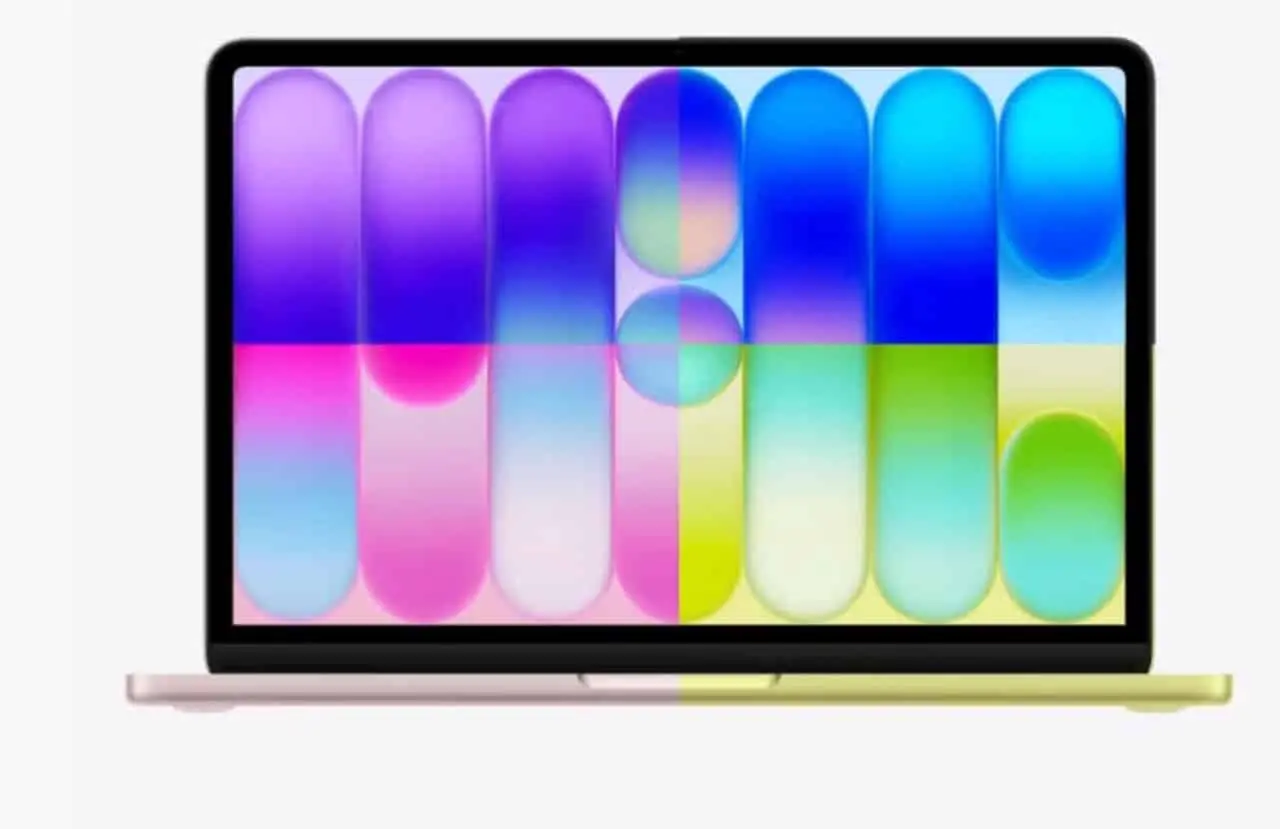
The arrival of a new Apple device always generates anticipation, and the announcement of the MacBook Neo was no different. Agora, much to the delight of brand enthusiasts, the acclaimed default background images of the recently launched laptop are now accessible, allowing immediate customization for users of other Macs.
The online community has moved quickly to make these new features available, reflecting the excitement surrounding what the MacBook Neo represents in terms of innovation and design. Essa the agility in offering visual elements demonstrates the cultural impact of each company launch.
The visuals match the four stunning colors in which the MacBook Neo was introduced: citrus yellow, indigo, blush, and silver. Cada hue offers a distinct aesthetic experience, inviting users to harmonize their devices with the latest trends.

Groundbreaking MacBook Neo launch redefines mobile technology
The presentation of the MacBook Neo marked a significant moment in the world of technology, introducing equipment that promises to raise standards of performance and user experience. With a bold design and improved features, the device quickly captured the attention of the global market, positioning itself as a milestone in the evolution of portable computers. Este launch, which took place in a scenario of growing demand for innovation, highlights Apple’s continuous search for excellence, offering solutions that integrate beauty and robustness.
The innovations in the MacBook Neo are not just limited to its powerful hardware or sophisticated aesthetics. The operating system has been optimized to make the most of its potential, ensuring fluidity and responsiveness in all tasks. The promise of a long-lasting battery and even deeper integration with the Apple ecosystem are just some of the points that consolidate the MacBook Neo as a disruptive product, designed to meet the needs of demanding professionals and consumers who value cutting-edge technology.
Style and personalization: the essence of new looks
The new MacBook Neo wallpapers are not just background images; they represent an extension of the design and philosophy behind the device. Cada art was carefully crafted to complement the aesthetics of the laptop, with patterns and colors that speak directly to the hardware’s finishing options. Essa visual integration is crucial to the Apple experience, where every detail is thought out to create perfect cohesion between software and hardware.
The ability to personalize the digital environment of your computer or mobile device with these visuals offers users a straightforward way to infuse it with a touch of modernity and exclusivity. The choice of wallpaper goes beyond aesthetics, reflecting the user’s individuality and appreciation for contemporary design. It’s a simple but impactful way to keep your device’s interface in line with the brand’s latest aesthetic trends.
Learn more: Apple releases vibrant iOS 27 and iPadOS 27 wallpapers for immediate download ahead of official arrival
How to get exclusive images of the new line
The early availability of MacBook Neo wallpapers by the community, notably by enthusiasts like Basic Apple Guy, demonstrates the passion and speed with which new release content is disseminated. While official full-resolution versions are still awaited, these initial builds allow users to get ahead and start enjoying the new visuals. The initiative of these employees is fundamental to the propagation of technological culture and to satisfy the curiosity of consumers.
It is important to note that at this early stage, the images may not have the same resolution or the same level of detail as the versions that will be extracted directly from the MacBook Neo operating system. Contudo, the current quality is enough to provide an impactful and distinctive visual experience. Essa The practice of early release by the community is common after major announcements, serving as a warm-up for the definitive versions.
To access these images, interested parties should look for reliable wallpaper repositories dedicated to Apple products, where download links are generally organized by color and resolution. The convenience of finding these options in one place makes the choice and acquisition process easier for users who want to renew the look of their devices without delay. The community plays a vital role in curating and distributing this content.
Choosing your color: the vibrant variants
Among the color options for the MacBook Neo, the citrus yellow hue stands out for its vivacity and energy. Este wallpaper reflects a modern and bold aesthetic, ideal for those looking for a look that conveys optimism and creativity, adding a touch of freshness to the device’s screen. It’s a choice that certainly won’t go unnoticed.
More on this story: Anticipate the look of iOS 27 and iPadOS 27 by downloading the new wallpapers for iPhone and iPad
See Also


The indigo variant, in turn, offers an elegant contrast, evoking a feeling of depth and sophistication. With darker and richer tones, this wallpaper option is perfect for those who prefer a calmer and more contemplative atmosphere, but without giving up the visual distinction characteristic of Apple.
For those who appreciate a touch of delicacy and modernity, blush presents itself as a charming alternative. Este wallpaper with its soft and pink nuances conveys a feeling of lightness and contemporary, ideal for users looking for a more welcoming and innovative design.
Finally, the silver version, an Apple classic, offers a clean and timeless look. Este wallpaper symbolizes the brand’s minimalist elegance, being a versatile choice that adapts to any environment and preference, soberly reinforcing the visual identity of the company’s products.
On the same topic: New Apple system update optimizes urgent task management for iPhone users
Step by step guide to install on your mac
After downloading the MacBook Neo wallpapers, the process to set them as the background image on your Mac is quite intuitive and can be done in two main ways. The first option, and perhaps the quickest, is to locate the image file in your downloads folder or wherever you saved it. Once found, right-click on the file. In the contextual menu that appears, select the option “Set as Imagem from Mesa”. Your Mac’s operating system will automatically adjust the image to suit your screen resolution, and your new wallpaper will be ready to display.
Alternatively, if you prefer greater control or want to explore other customization settings, you can access Ajustes from Sistema. Para this, click the Apple icon in the top left corner of the menu bar and select “Sistema Settings” (or “System Settings”, depending on your version of macOS). Dentro of the adjustments window, look for and click on the “Image of Fundo” section. Ali, you will see the current wallpaper options and can add new images. Clique in “Add Foto…” or “Add Pasta…” to navigate to the location where you saved the MacBook Neo wallpapers and select the desired image. Esta approach allows preview and management of multiple wallpapers.
Expanding personalization: iPads and iPhones
The flexibility of the new MacBook Neo wallpapers extends beyond computers, allowing iPad and iPhone users to also enjoy these vibrant images on their mobile devices. The installation process is equally simple, ensuring the customization experience is seamless across the entire Apple ecosystem. Basta save the desired image to your device’s photo gallery.
Once saved, go to the Fotos app, select the image, tap the share icon and choose the “Use as Papel of Parede” option. From there, you can adjust the image for the lock screen, home screen or both, adapting it perfectly to the shape of your iPad or iPhone, and thus reflecting the innovative design of the MacBook Neo on all your devices.
The importance of the background image for the user experience
Choosing the background image on a device goes far beyond a simple aesthetic preference; it plays a key role in user experience and productivity. A well-selected wallpaper can influence mood, reduce eye strain and even inspire. Ele creates a digital environment that aligns with the individual’s personality and needs, transforming daily interaction with technology into something more pleasant and personal.
More on this story: Details of Galaxy Z Fold 8 wallpapers leak and point to bold design and new color options
For Apple, creating iconic wallpapers is an integral part of the identity of its products. Cada set of background images is designed to complement the hardware and software, reinforcing visual cohesion and the premium experience. Essa attention to visual details contributes to brand recognition and user satisfaction, who feels part of a sophisticated and innovative design universe.