

Consumers investing in state-of-the-art equipment often face a silent technical obstacle that prevents them from taking full advantage of the hardware they purchase. Connecting modern consoles and advanced media players to high-resolution televisions does not automatically guarantee the delivery of the best possible visual fidelity. A factory configuration, present in the overwhelming majority of panels available on the market, restricts the bandwidth of the input ports, leveling the data transmission capacity downwards. Essa technical security measure aims to avoid conflicts with old devices, but ends up strangling the flow of information from devices that require high processing capacity.
The devices most affected by this invisible barrier include the PlayStation 5, the Xbox Series X and hundreds of media centers such as the Apple 4K TV. Esses devices are designed to send dense packets of visual and sound data continuously, requiring completely unobstructed communication paths. Quando the television reception port operates in standard mode, the source system recognizes the limitation and automatically reduces the quality of the signal sent, adapting to the bottleneck imposed by the screen.
The direct consequence of this restriction is the deactivation of advanced visual resources that justify the investment in modern screens. Color depth is reduced, dynamic range (HDR) loses its effectiveness and the frame refresh rate suffers drastic cuts. The user, often without in-depth technical knowledge, consumes the content believing that they are facing the maximum capacity of their equipment, when in fact they are viewing a compressed and simplified version of the original image.
Signs that the system is operating at reduced capacity are specific and can be identified during daily use. Entre The main symptoms are the inability to activate the 120 frames per second mode in compatible games, the absence of intense brightness in scenes that should highlight HDR, the appearance of visible bands in color gradients in the sky or in shadows, and the lack of sharpness in smaller texts displayed in the operating systems interface.
Technical reasons for factory limitation
The manufacturers’ decision to keep communication ports restricted by default is based on a strategy to mitigate damage and reduce operational costs. The global television market serves a vast audience, which often connects devices that are more than a decade old, such as old DVD players or cable TV decoders from previous generations. Esses devices operate with outdated communication protocols and cannot interpret high-density signals.
If the input ports were factory configured to accept maximum bandwidth, connecting an older device would result in immediate failures. The most common symptom would be the total absence of an image, accompanied by noises or error messages with an unsupported format. Essa incompatibility would generate immediate frustration for the average consumer, who would not understand the origin of the problem.
To avoid overloading customer service centers and mass returns of perfectly good televisions, the industry opted for a conservative standard. The responsibility for releasing the data stream has been transferred to the advanced user, who must access the screen’s internal operating system menus and manually change the signal reception parameters for each specific input used.
Direct impact on frame rate and colors
Bandwidth restriction severely affects how pixels are filled with color information, a process technically known as chroma subsampling. In an ideal scenario, the console sends a signal without color compression, allowing texts to be perfectly sharp and the edges of virtual objects to maintain their integrity. With the port operating in restricted mode, the system is forced to compress this data, resulting in visual artifacts around bright elements and the loss of fine detail in complex textures, detracting from the visual immersion intended by software developers.
In addition to color degradation, the limitation impedes the data traffic necessary to sustain high refresh rates combined with maximum resolution. Jogos competitive games that rely on quick responses lose the fluidity of 120 frames per second, becoming stuck at the 60 frame limit. The depth of HDR is also lowered, preventing the panel from displaying the brightness peaks necessary to simulate the glare of the sun or the brightness of explosions, making the image washed out and far from the original studio calibration.
Nomenclatures used by the main manufacturers
The lack of standardization in the operating systems interface makes it difficult to resolve the problem. Cada TV manufacturer adopts a different commercial term for the same bandwidth release function. Nos Samsung brand devices, the user must navigate to the external device management menu and look for the option that activates the expanded color signal for the desired port.
On televisions manufactured by LG, the path involves accessing the advanced picture settings and locating the additional adjustments section. The nomenclature used by the South Korean company generally refers to deep colors in ultra high definition, requiring the owner to activate a virtual key corresponding to the physical input where the console is connected.
Sony, responsible for the Bravia line, uses a more direct approach in its signal format menus. The interface requires the user to change the port status from the standard format to the enhanced format, an action that restarts communication between the display and the source device to establish the new high-speed data transfer protocol.
Other popular brands, such as TCL and Panasonic, also hide these release keys in submenus of entries or system preferences. The general rule requires the owner to ignore basic brightness and contrast adjustments, always looking for the system or hardware tabs to find video signal format options.
Required specifications for physical connection
Changing the television menus only solves the logical barrier of the problem, requiring the physical infrastructure to keep up with the new data demand. Using old or low-quality cables creates a physical bottleneck that prevents communication, even with the ports configured correctly. The transmission of ultra-high definition signals at high frame rates requires conductors with specific ultra-high speed certification.
The difference in capacity between cable generations is substantial and determines the success of the operation. Enquanto previous standards support traffic of 18 gigabits per second, the current generation required for modern consoles requires lanes capable of carrying 48 gigabits per second. Using an inferior cable in a freed port results in intermittent picture cuts and audio sync failures.
Bandwidth release procedure
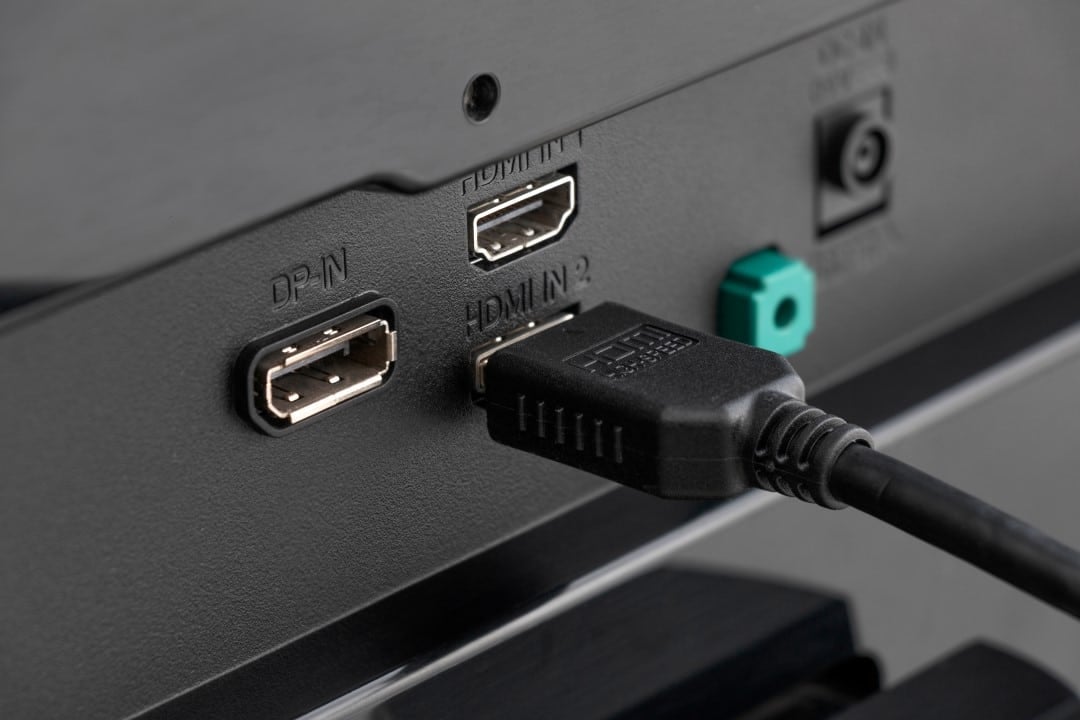
The process of adapting the system requires a methodical approach on the part of the user, starting with the physical identification of the ports on the rear panel of the television. Após connect the certified cable to the correct input, it is necessary to use the screen’s original remote control to access the main settings menu. The exact path varies, but generally involves navigating to the connections, external inputs, or device management section. Dentro of this submenu, the user will find a numbered list corresponding to the device’s physical ports. When selecting the specific port the console is connected to, a signal format option will be displayed. Changing from standard mode to enhanced or expanded mode will cause the screen to flicker or restart briefly. Este behavior is normal and indicates that the television’s main board logic controller is renegotiating the communication protocol with the external device, now without the bandwidth constraints that limited image quality.
Care when connecting old devices
Bandwidth release must be applied selectively, restricted only to ports that receive state-of-the-art equipment. Manter the other inputs in standard mode is essential to guarantee the stability of decoders from television operators, older media players and consoles from previous generations, preventing these devices from suffering from synchronization failures caused by a data path that is oversized for their capabilities.
Port management on the back panel
A technical detail often ignored is the disparity in capacity between the ports on the same television. Most models available on the market do not offer maximum support for all of their physical connections. It’s common for only one or two rear ports to have the hardware needed to process the full volume of data required by modern consoles.
Carefully checking the owner’s manual or the inscriptions printed on the device’s chassis is a mandatory step. Ligar a state-of-the-art equipment on a secondary port, even after carrying out all software configurations and using the correct cable, will keep the system operating with restrictions, nullifying the effort to optimize visual fidelity.



