
Asus reduces the value of the ROG Ally portable console to $499 and intensifies competition in the gamer market


Hardware maker Asus has confirmed a strategic shift in the positioning of its flagship device aimed at gaming on the go. The ROG Ally portable console has had its official price reduced to $499 on the international market, a move designed to attract consumers looking for the full desktop computer experience in a mobile format. The decision aims to democratize access to high-performance equipment, previously restricted to specific niches of technology enthusiasts.
With this financial readjustment, the company seeks to consolidate its presence in a segment that is experiencing continuous growth and attracting more and more fans. The commercial strategy focuses directly on rivaling other devices based on open operating systems, offering a robust alternative for those who demand portability without giving up graphic quality and advanced processing.
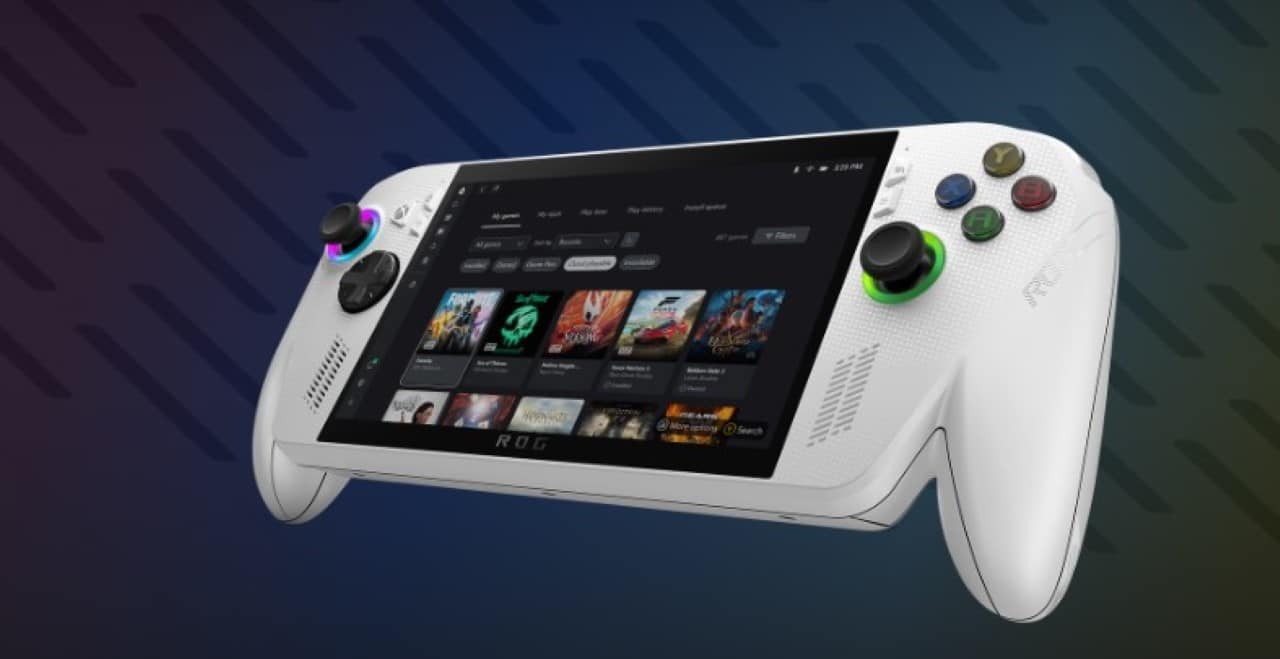
The current digital entertainment scenario requires quick adaptations from the sector’s giants, and the new pricing reflects a careful reading of players’ demands. The cost reduction does not change the technical specifications of the device, maintaining the promise of running complex titles anywhere, ensuring that premium hardware reaches the hands of a wider audience.
Commercial dispute in the notebook segment
The change in the value table places the device in a position of competitive advantage compared to its main direct competitors. The handheld console market has undergone a recent revolution, requiring brands to adjust their profit margins to keep sales volume high and ensure public loyalty.
By setting the level at $499, the manufacturer creates an aggressive entry barrier for new competitors and pressures rival companies to rethink their own pricing strategies. The end consumer ends up being the biggest beneficiary of this trade war, gaining access to cutting-edge technologies at considerably more affordable costs.
Processing architecture and raw performance
The heart of the equipment is powered by the AMD Ryzen Z1 processor, specifically developed to meet the rigorous power and thermal dissipation demands of mobile devices. Este chip uses the Zen 4 architecture, with six physical cores and twelve threads of simultaneous execution, delivering significant computing power for the format.
To handle the rendering of complex virtual environments, the system integrates graphics based on RDNA 3 technology, equipped with four computing units. Essa combination guarantees the fluidity necessary to run the industry’s latest titles, offering a stable frame rate even in highly visually demanding scenarios.
Energy flexibility is another central point of the project, allowing the user to adjust consumption between 9 watts and 30 watts, depending on the needs of the moment. Essa intelligent energy management makes it possible to switch between maximum economy and extreme performance modes with just a few touches on the screen, adapting the console to different usage profiles.
Visual quality and screen refresh rate
The device’s visual interface is built around a 7-inch touch-sensitive panel, using IPS technology to ensure wide viewing angles and faithful color reproduction. The native resolution of 1920 x 1080 pixels delivers sharp and detailed images, essential for immersion in the virtual worlds created by developers.
One of the biggest differentiators of this screen is its refresh rate of 120 Hz, a feature often found only in high-cost desktop monitors. Essa update speed eliminates traces in fast-paced action scenes and provides an almost instantaneous response to player commands, raising the competitive bar.
To ensure the integrity of the display against impacts and scratches from daily use, the surface is protected by Gorilla Glass Victus glass. Maximum brightness reaches 500 nits, allowing comfortable use of the equipment even in outdoor environments with strong sunlight, without loss of contrast.
Frame synchronization is managed by FreeSync Premium technology, which acts directly to eliminate image breaks and visual stuttering during playback. The result is an extremely smooth viewing experience, essential for maintaining mechanical precision in games that require quick reflexes.
Cooling system and ergonomic design
Maintaining high-power components at safe temperatures within a compact chassis requires advanced and efficient engineering solutions. The cooling system called Zero Gravity uses heat pipes with a special internal mesh, designed to work with maximum efficiency regardless of the inclination or position in which the device is held. The heat generated by the processor and memory circuits is quickly dissipated by two silent fans located at the top of the structure, preventing overheating during long sessions of use and ensuring the longevity of internal parts.
The ergonomics were carefully calculated to minimize hand and wrist fatigue, resulting in a total weight of just 680 grams, an impressive figure for the category. The balanced distribution of internal components prevents the device from tilting to one side, while the buttons, triggers and analog levers have been positioned following strict standards of biomechanical comfort. The texture applied to the contact areas guarantees a firm grip, preventing accidental falls caused by natural hand sweat and providing tactile security.
Software integration and operating environment
Unlike some competitors that opt for operating systems based on closed or customized architectures, this equipment runs the full version of Windows 11, which exponentially expands its compatibility with different online stores and digital distribution platforms. Para To overcome the challenges of navigating a traditional desktop interface on a 7-inch screen, the manufacturer developed proprietary software Armoury Crate SE, which acts as a unified and intuitive command center. Este application organizes the user’s entire software library in a single location, regardless of where the files were acquired, and offers quick shortcuts to crucial system tweaks. Através From this custom interface, you can change button lighting, monitor CPU and GPU usage in real time, manage thermal performance profiles, and map specific shortcuts for each application. Choosing the Microsoft ecosystem ensures that any program, communication application or productivity tool compatible with conventional computers can run natively on the notebook, transforming it into a general-purpose machine when connected to external peripherals such as a keyboard and mouse.
Power autonomy and connectivity options
The system is powered by a 40-watt-hour battery, designed to offer an ideal balance between structural weight and usage time away from sockets. Fast charging is done via a USB port
Storage capacity and RAM memory
Managing multiple tasks and quickly loading heavy scenarios is ensured by 16 gigabytes of high-speed LPDDR5 RAM. Internal storage features a 512 gigabyte NVMe SSD, complemented by a UHS-II microSD card reader, allowing easy and quick expansion of the available space for installing new files without having to open the console.




