Galaxy S25 gets leaked One UI 8.5 changelog with new AI features and renewed design
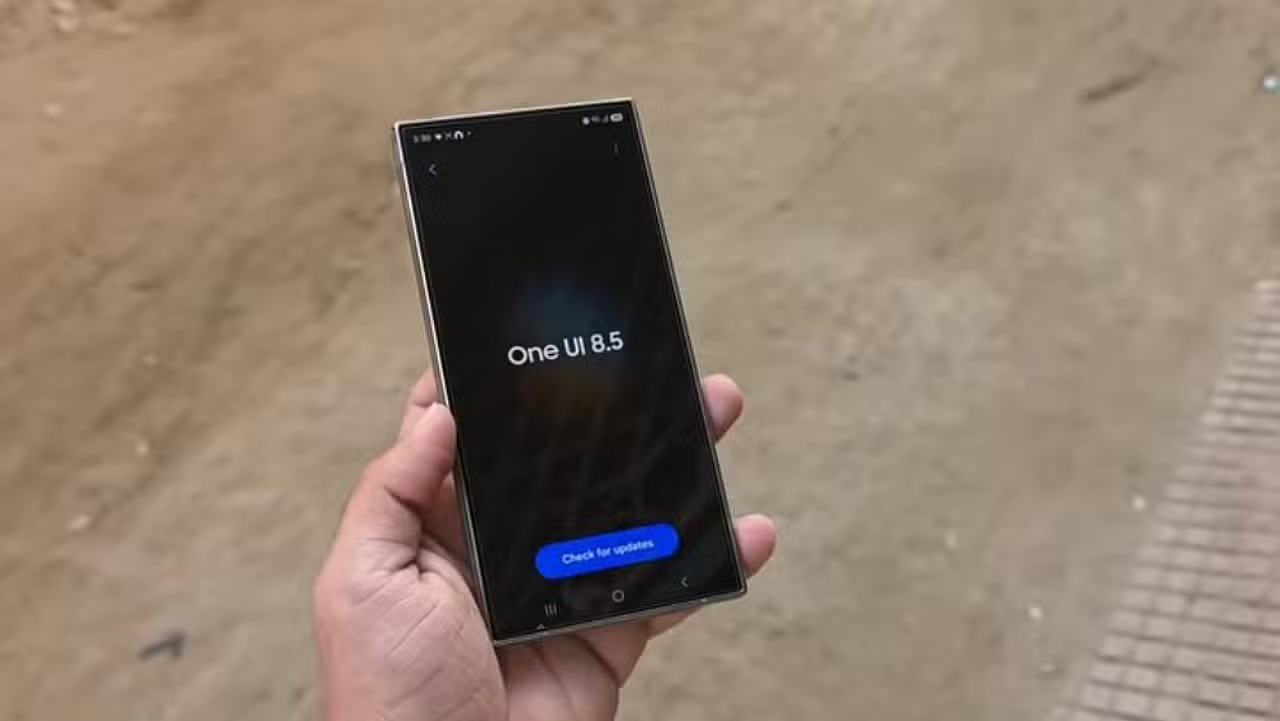
The One UI 8.5 changelog for the Galaxy S25 series has appeared in specialized sources. The document lists several changes that should arrive soon in the stable version.
Especialistas has been following the development of the update for months. The leak provides details about design, artificial intelligence and everyday tools. Usuários from the S25 line awaits official release, which should take place in the coming weeks.
Design look more integrated into daily use
One UI 8.5 aims for a more refined look. Efeitos transparent blur adds depth to screens. Floating Elementos react organically to the user’s touch and movement.
The result is an interface that better adapts to your workflow. Layouts are cleaner. Navigation becomes more fluid without losing the identity of the One UI.
- Transparent blur Efeitos in multiple menus
- Elementos that respond to usage flow
- Personalização that looks more natural
- Overall more sophisticated and affordable Visual
Galaxy AI gains practical editing tools
Galaxy’s artificial intelligence is highlighted. Usuários can edit photos with simple text commands. Basta describe the desired change to change colors, add objects, or adjust details.
Outra function allows you to copy items from one image and paste into another with smooth transition. Assistente from Fotos now applies styles to any photo, not just portraits. Geração continuous imaging avoids saving each intermediate version.
The Estúdio Criativo gains a shortcut on the applications screen. Lá can create custom wallpapers, stickers and profile pictures. AI selection also improves with prolonged touching of the side handle.

Bixby becomes more conversational and useful
The virtual assistant evolves. Usuários speak naturally without needing exact commands. The Bixby understands the order and finds the right configuration.
Histórico of conversations appears in the side panel for quick reference. The call screening feature with text helps you decide if it’s worth answering. Detecção automatic language setting in Intérprete keeps conversations flowing.
Câmera receives convenience improvements
The camera gains speed when scanning documents. A button automatically appears when pointing to papers. The tool removes fingerprints and distortions for professional-quality PDF.
Gravação dual video is made simpler with one touch quick controls. Pré – Real-time color previews in Log mode show the final result before recording. Fotos with motion detection saves space by recording dynamic scenes only.



Novos portrait filters add vibrant effects. Tudo this reinforces user control when capturing content.
Telas starting and blocking gain smart options
Papéis wallpaper with photos of people or animals automatically adjusts to the layout of the clock and widgets. Efeitos current weather can be added directly into the preview.
The weather forecast widget displays precipitation graph for the next few hours. Índice pollen helps those with allergies. Mensagens recorded voice messages appear on the screen during the call. Respostas fast opt-outs take calendar events into account.
Conectividade and Samsung ecosystem expand
Compartilhamento of files between Galaxy devices becomes more direct. The Meus Arquivos app shows content from other branded cell phones, tablets and PCs.
Quick Share now works with AirDrop-compatible Apple devices. Usuários set up family groups to share hotspot, screen and storage more easily.
Recursos and Auracast allow you to stream voice along with media audio. Conexão with Smart View gains home screen shortcut for quick mirroring.
Bateria, security and accessibility receive adjustments
The battery settings screen shows weekly usage more clearly. Modos power saving options offer standard and maximum options with customizable limits.
Anti-theft Proteção locks the screen after failed authentication attempts. Privacy Alertas warns about risky permissions on apps.
Controles of Bluetooth hearing aids are accessible via shortcut. Opções magnification follows the mouse or keyboard cursor. Gravação partial screen allows you to select only part of the image.
The leak confirms that One UI 8.5 balances visual changes with practical improvements. The update should first arrive on Coreia from Sul around April 30, with a global rollout in the following days. Usuários of the Galaxy S25 series should receive the stable version soon.
See Also em Latest News (EN)

Apple’s first foldable smartphone has a hollow design with a high-capacity battery and a thin thickness
25/04/2026
Rumors suggest that Apple is preparing iPhone 18 Pro with translucent chassis and 5200 mAh battery
25/04/2026
Sony releases free redemption of two major games for PlayStation 5 users on the official store
25/04/2026
Galaxy Z Fold 8 Wide gains leaked dimensions with wider and thinner screens
25/04/2026
Speaker stabs man in audience at event at Furb in Blumenau
25/04/2026
Xbox may launch customizable Game Pass plan with choice of benefits
25/04/2026
Léo Scienza overcomes rejection at Gre-Nal and shines with 7 goals and 10 assists in England
25/04/2026
Neymar is left out of the 2026 World Cup album and Panini reveals selection criteria
25/04/2026
Militão will need surgery and is out of the 2026 World Cup
25/04/2026
Compressed air pistol shots injure couple after April 25th parade in Rome
25/04/2026
2004 Nobel Prize-winning physicist says chance of living another 50 years is slim due to nuclear war
25/04/2026