


The “Storage Quase Cheio” notification has become a common occurrence for millions of iPhone users, making space management a constant challenge. The warning appears unexpectedly and paralyzes essential activities, such as taking photos, downloading applications or even updating the operating system, generating immediate frustration.
The problem is not restricted to older models or those with lower factory capacity. Mesmo devices with 128 GB, 256 GB or more can quickly succumb to the accumulation of files, often from sources that the user has no idea are consuming so much data.
Understanding which are the main responsible for the accelerated consumption of internal memory is the first step to definitively resolving the issue. From high-resolution media to hidden system data and application caches, each category requires a specific approach for effective and long-lasting cleaning.
The impact of 4K videos and high-resolution photos
The main cause of memory exhaustion on most iPhones remains the photo and video gallery. The advanced cameras on modern devices produce sizable files that accumulate quickly. A single minute of video recorded in 4K at 60 frames per second can take up approximately 400 MB. For professionals and enthusiasts who use the Apple ProRes format, this number jumps to an impressive 6 GB per minute of recording, which can fill a device’s memory in just a few minutes. Além of videos, photographs in formats such as ProRAW can generate files of more than 25 MB each, much larger than the size of a standard photo. Recursos like Live Photos, which capture a short video along with the image, also double the space required, a detail that many users are unaware of when analyzing what weighs the most on their device.
System Data: The Mystery of the Disappearing Gigabytes
One of the most puzzling and frustrating categories in storage analysis is “Sistema Data” or “System”. Frequentemente, it occupies tens of gigabytes without a clear explanation of its composition. Essa section groups a variety of temporary files, such as Safari application and browser caches, activity logs, Siri voices, fonts, and other resources that iOS uses to function optimally. Embora the system is designed to manage these files automatically, failures can occur, leading to uncontrolled growth of this volume.
The best way to reduce the size of Dados and Sistema is to initially restart the device, which forces some caches to be cleared. If the problem persists, connecting your iPhone to a computer via cable and syncing it with Finder (on macOS) or iTunes (on Windows) can recalculate the space and eliminate unnecessary files. In extreme cases, the most effective solution is to perform a full backup of the device, restore it to factory settings, and then recover the data from the backup, a process that eliminates corrupted and orphaned files.
Social networks and messengers as major memory consumers
Messaging and social media applications are true data accumulators, operating silently on the iPhone’s storage. WhatsApp, for example, automatically saves all photos, videos, audios and documents received, and a single active group can easily generate gigabytes of content in a few months.
Telegram, although it offers more control over the cache, can also accumulate a significant volume of temporary files if not configured correctly. It’s critical to explore the app’s storage settings to limit the time media stays on the device.
Networks like Instagram and TikTok also contribute to the problem by caching all viewed videos and images to speed up future loading. Esse cache grows continuously and is rarely cleaned automatically by the system.
To free up this space, you need to check each app’s internal settings for an option to clear the cache. Quando this function is not available, the most efficient alternative is to uninstall and reinstall the application, a method that removes all accumulated temporary data.
Downloaded offline games and content
Modern mobile games offer complex graphics and immersive experiences, but this comes at a high cost in terms of storage. Popular Títulos such as Genshin Impact, Call of Duty Mobile or Asphalt 9 may exceed 15 GB or 20 GB after installing all updates and additional content packs. Muitos users don’t realize that the initial download size on App Store is only a fraction of the total space the game will take up.
Another common source of space consumption is content downloads for offline consumption on streaming services. Músicas downloaded on Spotify, series on Netflix or YouTube videos Premium can take up a substantial amount of memory. It is best practice to periodically review the downloads section of these apps and remove content that has already been watched or listened to, freeing up precious gigabytes.
Native iOS tools for space optimization
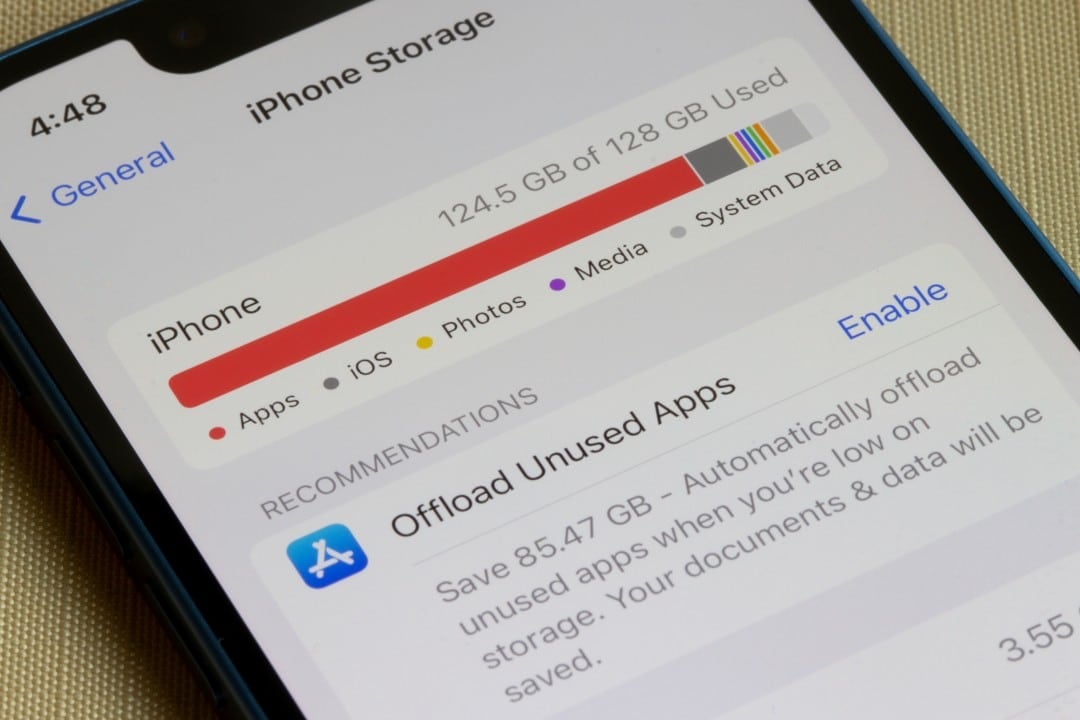
iOS itself offers powerful tools to help users manage storage. When you go to “Settings,” then “General,” then “iPhone Storage,” the system displays a detailed graph that shows you exactly what’s taking up space, as well as providing personalized recommendations for optimization.
One of the most useful features is “Uninstall Apps Não Usados”. Quando enabled, it automatically removes applications that have not been opened for a long time, but preserves all documents and data associated with them. If the user decides to reinstall the app in the future, their information will be intact.
Additionally, the storage screen suggests direct actions such as “Review Vídeos Grandes” or “Review Anexos Grandes” in iMessage. Essas sections list the heaviest files on the device in order of size, allowing for quick, targeted deletion of what is no longer needed.
How to use cloud services strategically
The most effective way to deal with physical storage limitation is to transfer part of the files to cloud services. Apple’s iCloud is the most integrated solution in the ecosystem, and its “Optimize Armazenamento” function for photos is essential. With it activated, the iPhone keeps low-resolution versions of images and videos on the device, while high-quality originals are safe in the cloud, only being downloaded when the user accesses them.
There are also excellent alternatives that can complement or replace iCloud. Google Fotos is known for its powerful search engine and offers a generous storage plan. Serviços like Microsoft OneDrive and Dropbox are ideal for documents and work files, allowing entire folders to be synced to the cloud and removed from the device without loss of access.
Creating a maintenance routine to avoid surprises
Storage management should not be a reactive action, performed only when the insufficient space warning appears. Adotar A preventative maintenance routine is the key to keeping your iPhone running smoothly and always ready to record new moments. Dedicar a few minutes each month to review the gallery, delete unused apps, clear the messenger cache and check offline downloads can save you headaches and ensure that the available space is always enough for everyday needs.



