OnePlus Pad 4 maintains its predecessor’s design with new colors and brighter screen
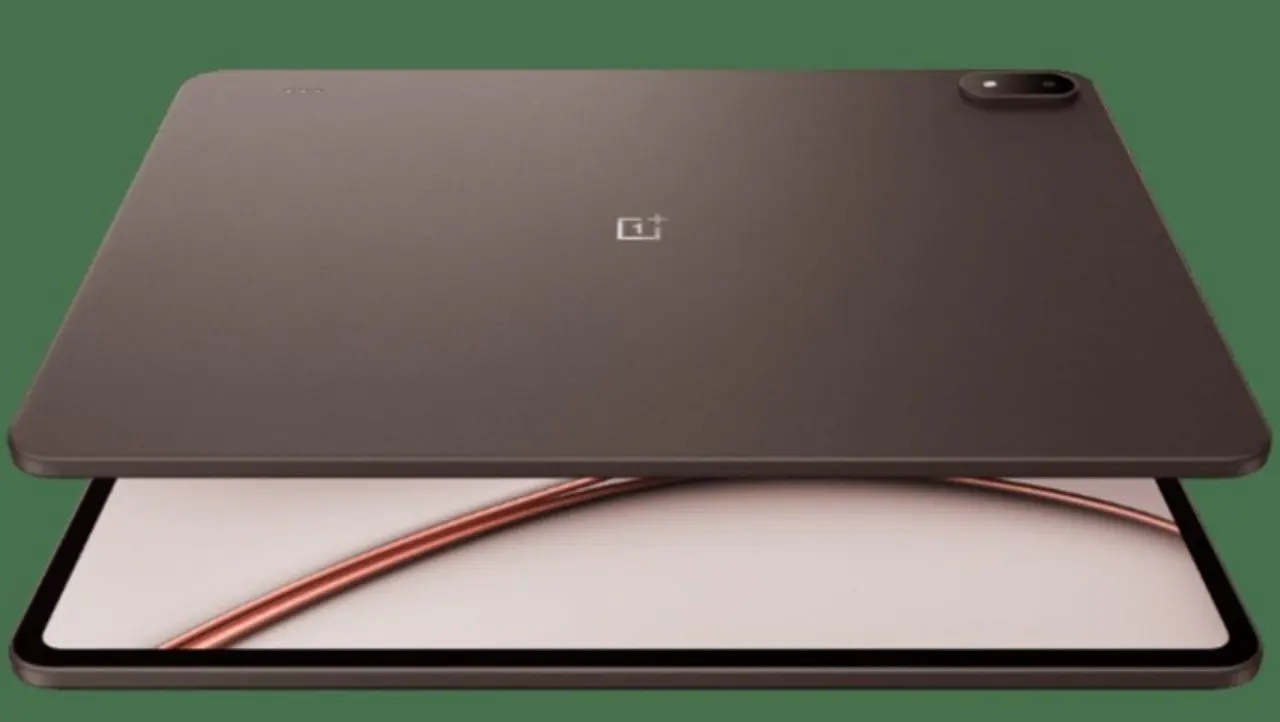
The OnePlus Pad 4 follows the same design language as the Pad 3, with few significant visual changes. OnePlus introduces two new colors, Dune Glow and Sage Mist, while discreetly repositioning the keyboard contact pins. Além In addition, little changes in the external appearance of the device. The design maintains its elegance, with clean aesthetics and an extraordinarily slim side profile. At just 5.94mm thick, the tablet surpasses even the iPad Air in this regard, although the camera bump is noticeable when resting on flat surfaces. The protrusion exists for a practical reason: such a thin and large device would be awkward to pick up if it were completely flat, especially considering the design’s flat side profile.
The reduced thickness and moderate weight make handling easy despite the considerable size. Contudo, the physical side buttons remain difficult to access, a problem inherited from the previous model. The power button is tolerable, as there are alternatives to activate the device, but the volume buttons are never in a convenient position, regardless of how you hold the device. The decision to position them on the long side instead of the short sides remains incomprehensible.
Fixação pen and construction in focus
The top edge houses the pen’s magnetic attachment. Como the tablet is thinner than the pen, placing it on a surface with the back completely level causes the pen to tilt slightly. The magnetic adhesion is firm enough to keep the pen secure without risk of detachment even when pressed against surfaces.
Overall, the design offers little new for those who enjoyed the Pad 3. Tudo what worked in the previous model applies equally to the Pad 4.
Asked the #OnePlusPad4 to take an AnTuTu test. It showed up and showed off with a score of 4M+
— OnePlus India (@OnePlus_IN) May 4, 2026
Sale starts May 5, 12 PM IST
Get notified: https://t.co/Ulp8gRflZj pic.twitter.com/RcH4pD71q9
Tela 13.2-inch LCD with enhanced brightness
The OnePlus Pad 4 uses a 13.2-inch IPS LCD panel with a resolution of 3392 x 2400 pixels, support for a refresh rate of up to 144Hz and 12-bit color depth per channel. Essa is the same screen as last year’s Pad 3. OnePlus made minimal adjustments, raising the peak brightness from 900 nits to 1000 nits, a discreet but significant improvement for use in bright environments.
The panel impresses with its size, resolution, color accuracy, wide viewing angles and high brightness. Contudo, remains an LCD; Contrast is limited without per-pixel lighting or local dimming, resulting in noticeable high blacks in high-contrast scenes. The 7:5 aspect ratio does not favor cinematic content, generating frequent black bars on the edges of the screen during video playback.
The tablet supports all major HDR standards, including Dolby Vision, but testing was not possible. The Netflix application on the device played only in standard definition, a recurring problem in OnePlus tablet launches. Mesmo companies solve HD playback, HDR support is rarely implemented. Considerando though few services offer Dolby Vision in Android, the inclusion seems unnecessary for the fourth generation in a row.
Leia Também

Parachuting plane crash leaves eleven dead in northeastern France this Sunday

Financial analysis indicates that GTA 6 generated US$1 billion in the first hour of pre-sales
George Russell secures second Formula 1 triumph and leads Austrian GP after controlling Verstappen and Antonelli
Motion Response and Touch Rejection Problemas
Performance during fast movements falls short because of the inherent response times of IPS compared to OLED. Texto becomes blurry and difficult to read when scrolling, especially at rates above those natively supported by the panel.
Quanto at high refresh rates, the panel reaches 144Hz mainly in selected games. OnePlus is more flexible in situations of accessing high rates on LCD, as they consume less energy than OLED at these frequencies. It is possible to access the full 144Hz by browsing the Chrome, for example.
The worst aspect of the screen is not the panel’s fault, it is the total lack of touch rejection at the edges. The Pad 4 has super-thin bezels that look great photographically and in person, but leave minimal space to hold the device. Qualquer minimal skin contact with the screen at the edges causes complete locking of the touch response.
Existe reason for the iPad Air to have substantial bezels despite its excellent palm rejection system integrated into iOS. The Pad 4 suffers from a double disadvantage: no palm rejection and extremely thin bezels. Older OnePlus tablets faced a similar issue, but had larger edges allowing for contouring. The size and weight of the Pad 4 make it practically impossible to hold it by just the 8mm available around the screen without interrupting the touch response.
Especificações panel techniques and features
Below are the technical details of the screen:
- Tamanho: 13.2 inches with 7:5 aspect ratio
- Resolução: 3392 x 2400 pixels (high density)
- Tecnologia: IPS LCD with 12-bit color depth
- Update Taxa: up to 144Hz (variable depending on application)
- Brilho maximum: 1000 nits peak
- Suporte HDR: Dolby Vision, HDR10+, HLG
- Ângulos vision: wide, IPS feature
The panel maintains the visual identity of the Pad 3 with incremental brightness improvements. Para consumption of multimedia content and reading, the screen fulfills its role well despite the contrast limitations inherent to the LCD. 144Hz support provides a competitive advantage in specific applications, particularly in games where the higher rate is supported.
The biggest challenge remains interacting with the device at the edges, a software and design issue that compromises the overall user experience, especially for large format tablets like this.